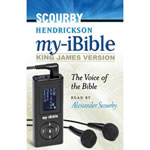
The Hendrickson My-iBible is a small simple audio device which makes it easy to listen to God’s Word wherever you go.

The device comes loaded with the complete text of the Bible. The Bible is read by Alexander Scourby.

* Complete audio text of the Bible in a lightweight, simple device
* No computer needed
* Simple device cannot be erased accidentally
* Memorization aid: can be set to repeat books, chapters, or your choice of segments
* Rechargeable. Package includes charger
* Comes with headphones; external speakers can also be used


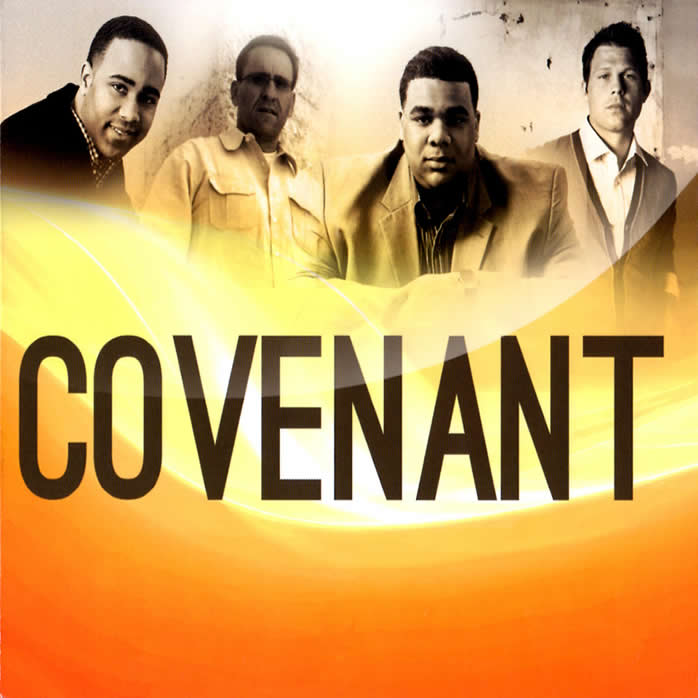
1. You’re Our God
2. We Will Overcome
3. No Other Name
4. Fall Down On U
5. Holy Lamb of God
6. Full And Running Over
7. Take This City
8. I Still Believe
9. Tis So Sweet
10. I Feel Heaven In This Place

Grab the guitar and play along with your favorite bands: tobyMac, Skillet, Stellar Kart, Newsboys, and more. Strum along to the on-screen cues, press the fret buttons, and advance through four levels of difficulty. As an expert, your fingers will be flyin’ — hitting all five buttons and playing the chords like a pro! Includes over 50 pulsating hits by top Christian artists. Jam with a fellow rocker with two-player action — either both on lead guitar or one on lead, one on bass. Sing along with the on-screen lyrics. Includes wireless guitar controller. For Windows and Mac computers.

  • Setting up the game is easy just load the software into any PC or Mac, plug in the wireless adapter, switch on your guitar and you’re ready to rock
  • Guitar Praise keeps the fun coming by allowing either one player to perform in solo mode, or two players to compete for the better lead guitar score. With a second guitar (not included but available), players can jam at the same time both on lead guitar, or one on lead and the other on bass. The game’s Power Duel mode also lets players send surprises that impact their opponent’s play
  • includes one wireless guitar controller, a USB wireless adapter, plus the game CD-ROM. (The guitar controller requires 4 AA batteries – not included.)

SenutiUnlock your iPod with Senuti, a simple Mac OS X application that allows you to transfer songs from your iPod or iPhone to your computer.

Use Senuti to transfer music after a hard drive crash, purchasing a new computer, or just to move music between computers. The stylish, award winning application is so easy to use, and provides an iTunes like interface with the ability to play or download tunes so you can manage all your music in one place.

* Lightning fast — There’s a little file on your iPod called the iTunesDB file. What does that mean to you? Nothing. What does that mean to us? Everything. Every bit of information for every song and playlist on your iPod is stored in this little file. It’s how iTunes knows what’s on your iPod, and how your iPod knows what’s there, too. It’s the fastest way to identify content on your iPod.
* Finding Songs — Senuti includes built in options to find what you’re looking for. Search and sort in many different ways. Know how the song goes, but don’t know if that title is quite right? Play it! That’s right, Senuti will play songs directly off of your iPod. It can even double as a jukebox player for your Shuffle or any other iPod.
* Playlists — Senuti not only reads playlists, but it allows you to transfer them back to your computer as well. A simple drag and drop action within the application will not only copy songs to your computer and add them to iTunes, but it will make a new playlist with the same name and add all of the songs to that list.
* Seamless Integration — Senuti will do all of the work for you. Have songs added to iTunes or organized into folders by artist and album. The choice is yours.

System Requirements:

* Mac OS X 10.4+
* Any iPod or iPhone
* Optional: iTunes v6.0.2+ for iTunes integration
Download Now

jZip – a free WinZip alternative

jZip – a free WinZip alternative

The new free jZip 1.3

  • Create, open and extract Zip, TAR, GZip and 7-Zip. Open and extract from RAR and ISO.
  • jZip is absolutely FREE for everybody, home and enterprise users
  • jZip is an easy to use and fast archiving software
  • jZip is based on proven 7-Zip technology by Igor Pavlov


   No Adware / No Spyware / No Pop-Ups / No Trojans

Professional Red Book Audio CD Mastering
Produce professional audio CDs to Red Book specification with CD Architect™ 5 software. Newly updated version 5.2 includes CD text reading and writing, and updated drive support. Perform full PQ code editing, trim events from full-length media and add as new tracks, import regions from Sound Forge® software as tracks, master audio by applying over 20 real-time DirectX® effects to events and the master output, and perform disc-at-once CD burning.

CD Architect software provides the most precise audio CD mastering and burning tools available. Arrange your CD Architect project using simple drag-and-drop operations. Produce complex crossfades and DJ-style megamixes. Generate multiple takes of a song to use in your project before burning. Create live-style CDs with audio in the time between tracks, apply volume envelopes and event ASR envelopes – even create hidden tracks. CD Architect software supports a long list of drives, including many FireWire and USB devices.
CD Architect Screenshot

AVG Anti-Virus Free EditionDownload Here

AVG Free Edition is the well-known antivirus protection tool. AVG Free is available free of charge to home users for the life of the product. Rapid virus database updates are available for the lifetime of the product, thereby providing the high level of detection capability that millions of users around the world trust to protect their computers. AVG Free is easy to use and will not slow your system down (low system resource requirements. Highlights include automatic update functionality, the AVG Resident Shield, which provides real-time protection as files are opened and programs are run, free Virus Database Updates for the lifetime of the product, and AVG Virus Vault for safe handling of infected files. Though the free version of this program will suffice for average folks, those who demand more control should certainly consider AVG Anti-Virus Professional.
DVDFab

DVDFab “DVD to DVD” is the most powerful and flexible DVD copying/burning software.

With 8 copy modes, you can backup any DVD to DVDR or hard drive in just one or a few clicks.

The DVDFab download includes: “DVD to DVD”, “Blu-ray to Blu-ray”, “DVD to Mobile”, “File to Mobile” and “File Mover”. For an explanation, please click here.

Safe Eyes
Fast, effective, and reliable, the Safe Eyes Parental Control Software is the ideal online protection for your entire family! Safe Eyes makes it easy to block objectionable material, limit time spent online, and control internet-based programs such as instant messengers, media players, and peer-to-peer file sharing applications. Its filtering servers are refreshed daily so your Parental Controls are always up-to-date. All account settings are stored on the Safe Eyes secure servers which allows your children to be covered regardless of which computer they use in your home. Whether you are using Windows or Mac OSX, Safe Eyes is the name you can trust to provide all of the benefits of the Internet with none of the worry.  
Safe Eyes Parental Control Software Includes:
Content Controls – Flexible content control allows you to select the types of website that are appropriate.
Program Controls – Control Instant Messengers, P2P File Sharing, and other harmful programs.
Time Controls – Control the amount of time spent online, and the times when the internet is available.
Usage Logging – Create and review logs of websites visited, programs used on the Internet, and Instant Messaging Chats.
Usage Alerts – Be notified instantly via email, text message, or phone call when someone visits inappropriate websites.


Introducing Palm® Pre™, a phone so in sync with your life it feels like it’s thinking ahead for you. Pre pulls your different online calendars into one view, bringing you the information you want without having to search for it. Pre links your contacts from different sources, giving you one place to find what you need. And Pre delivers incoming messages and notifications in an intuitively subtle way, letting you react or respond however you want.1 People, events, information that matters. With Palm Pre, it’ll come to you.

see layered calendars and linked contacts gallery

Layered calendars and linked contacts

Pre uses the Palm® Synergy™ feature to bring your Microsoft Outlook, Google, and Facebook® calendars together for one logical view of your day. And if you have the same contacts in different places, Pre can link them together, making it easier to find the information you need.2

See gallery

see activity cards gallery

Activity cards

Keep multiple applications open and move easily between them—email, maps, photos, websites, whatever. Pre thinks of your applications as activity cards, and lets you flip through them, move them around, or throw them away off screen.3

See gallery

see intuitive notifications gallery

Intuitive notifications

Things like text messages and calendar appointments appear as notifications at the bottom of the screen. You’ll know what’s going on without being completely interrupted or losing your train of thought.1

See gallery

see the combined messaging gallery

Combined messaging

Thanks to Palm Synergy, your conversations with the same person are grouped together in one chat-style view. Which means even if it started in IM, for example, you can reply with text. You can also see who’s online right from Contacts, and start a new conversation with just one touch.1

See gallery

see universal search gallery

Universal search

Simply start typing to begin searching your contacts and applications. Pre begins with contacts and apps on the phone, and then offers to search Google, Google Maps, Wikipedia, or Twitter. With a fast browser at 3G speeds, you’ll find what you’re looking for in no time.4

See gallery

see the Email, Wi-Fi, and GPS gallery

Email, Wi-Fi, and GPS

Check Microsoft Exchange email or personal email accounts like Gmail, Hotmail, and Yahoo!. Take advantage of Wi-Fi hotspots. And look up directions or nearby points of interest using GPS. It’s everything you need when you’re on the go.5

See gallery

see the Photos, Music, and Videos gallery

Photos, Music, and Videos

Take great pictures with the built-in camera and flash. Watch a video on the vibrant color touchscreen. Buy songs from the Amazon MP3 store and listen using the built-in music player. Plus, use the Palm media sync feature to transfer your DRM-free iTunes music, videos, and photos to your Pre.6

See gallery

see the Breakthrough design

Breakthrough design

Slide out the keyboard for faster and easier texting. Close it up and rotate Pre for music, websites, photos, and videos in full widescreen glory. You get the best of both worlds in one beautifully designed phone.1

See gallery

see the Applications

Applications

Get applications by browsing the catalog on your Pre, and then download them over the air directly to your phone. Apps designed for the Palm webOS™ platform are integrated with other apps on the phone. Buy movie tickets, for example, and you can add the times right to your calendar.1

Learn more

see Palm Services

Palm Services

Use over-the-air Palm Services to automatically back up your important data, restore it, or even remotely erase your data if your phone is lost or stolen. You also receive your software updates over the air without connecting to your computer.7

Learn more