 Download Here
AVG Free Edition is the well-known antivirus protection tool. AVG Free is available free of charge to home users for the life of the product. Rapid virus database updates are available for the lifetime of the product, thereby providing the high level of detection capability that millions of users around the world trust to protect their computers. AVG Free is easy to use and will not slow your system down (low system resource requirements. Highlights include automatic update functionality, the AVG Resident Shield, which provides real-time protection as files are opened and programs are run, free Virus Database Updates for the lifetime of the product, and AVG Virus Vault for safe handling of infected files. Though the free version of this program will suffice for average folks, those who demand more control should certainly consider AVG Anti-Virus Professional.
Category Archives: Software
Senuti
 Unlock your iPod with Senuti, a simple Mac OS X application that allows you to transfer songs from your iPod or iPhone to your computer.
Use Senuti to transfer music after a hard drive crash, purchasing a new computer, or just to move music between computers. The stylish, award winning application is so easy to use, and provides an iTunes like interface with the ability to play or download tunes so you can manage all your music in one place.
* Lightning fast — There’s a little file on your iPod called the iTunesDB file. What does that mean to you? Nothing. What does that mean to us? Everything. Every bit of information for every song and playlist on your iPod is stored in this little file. It’s how iTunes knows what’s on your iPod, and how your iPod knows what’s there, too. It’s the fastest way to identify content on your iPod.
* Finding Songs — Senuti includes built in options to find what you’re looking for. Search and sort in many different ways. Know how the song goes, but don’t know if that title is quite right? Play it! That’s right, Senuti will play songs directly off of your iPod. It can even double as a jukebox player for your Shuffle or any other iPod.
* Playlists — Senuti not only reads playlists, but it allows you to transfer them back to your computer as well. A simple drag and drop action within the application will not only copy songs to your computer and add them to iTunes, but it will make a new playlist with the same name and add all of the songs to that list.
* Seamless Integration — Senuti will do all of the work for you. Have songs added to iTunes or organized into folders by artist and album. The choice is yours.
System Requirements:
* Mac OS X 10.4+
* Any iPod or iPhone
* Optional: iTunes v6.0.2+ for iTunes integration

jZip
jZip – a free WinZip alternative

The new free jZip 1.3
- Create, open and extract Zip, TAR, GZip and 7-Zip. Open and extract from RAR and ISO.
- jZip is absolutely FREE for everybody, home and enterprise users
- jZip is an easy to use and fast archiving software
- jZip is based on proven 7-Zip technology by Igor Pavlov
 |
 |
|
|
||
 |
||
No Adware / No Spyware / No Pop-Ups / No Trojans
CD Architect 5
Professional Red Book Audio CD Mastering
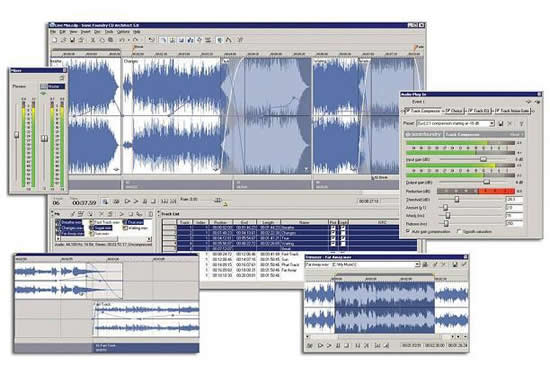
Produce professional audio CDs to Red Book specification with CD Architect™ 5 software. Newly updated version 5.2 includes CD text reading and writing, and updated drive support. Perform full PQ code editing, trim events from full-length media and add as new tracks, import regions from Sound Forge® software as tracks, master audio by applying over 20 real-time DirectX® effects to events and the master output, and perform disc-at-once CD burning.
Produce professional audio CDs to Red Book specification with CD Architect™ 5 software. Newly updated version 5.2 includes CD text reading and writing, and updated drive support. Perform full PQ code editing, trim events from full-length media and add as new tracks, import regions from Sound Forge® software as tracks, master audio by applying over 20 real-time DirectX® effects to events and the master output, and perform disc-at-once CD burning.
CD Architect software provides the most precise audio CD mastering and burning tools available. Arrange your CD Architect project using simple drag-and-drop operations. Produce complex crossfades and DJ-style megamixes. Generate multiple takes of a song to use in your project before burning. Create live-style CDs with audio in the time between tracks, apply volume envelopes and event ASR envelopes – even create hidden tracks. CD Architect software supports a long list of drives, including many FireWire and USB devices.